You have a website. You're paying for hosting. You might even be paying someone to manage it. But the enquiries aren't coming in — or they come in so rarely that you've started to wonder if the website is doing anything at all.
It almost certainly has a fixable problem. Usually more than one.
A website fails to generate leads when it lacks a clear call to action, talks about the business instead of the customer's problem, loads too slowly, fails to rank on Google, or looks untrustworthy enough that visitors quietly leave. Most struggling websites have at least three of these issues at once.
Here's what to look for — and what to do about it.
Reason 1: Your Homepage Talks About You, Not Your Customer's Problem
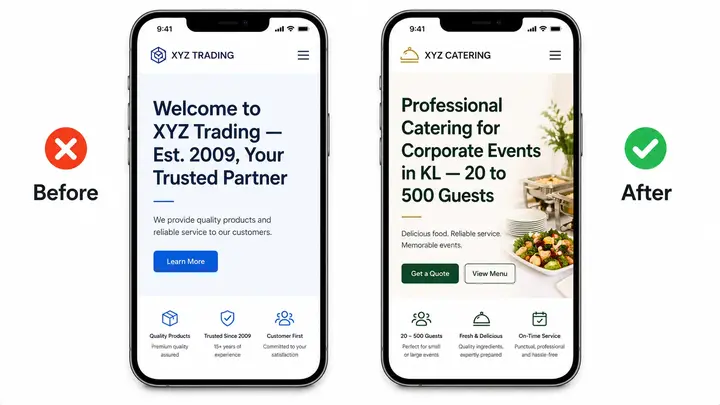
The most common mistake on small business websites: the homepage opens with the company name, founding year, and a mission statement nobody asked for.
A visitor who lands on your site has one question: "Can this business solve my problem?" If your homepage doesn't answer that within 5 seconds, they leave.
Fix: Rewrite your headline to name the customer's problem or desired outcome, not your business. Instead of "Welcome to XYZ Trading" try "Professional catering for corporate events in KL — from 20 to 500 guests." The customer instantly knows they're in the right place.
Reason 2: There's No Clear Next Step for the Visitor
A website without a strong call to action is like a shop with no counter. The visitor looks around, finds nothing obvious to do, and walks out.
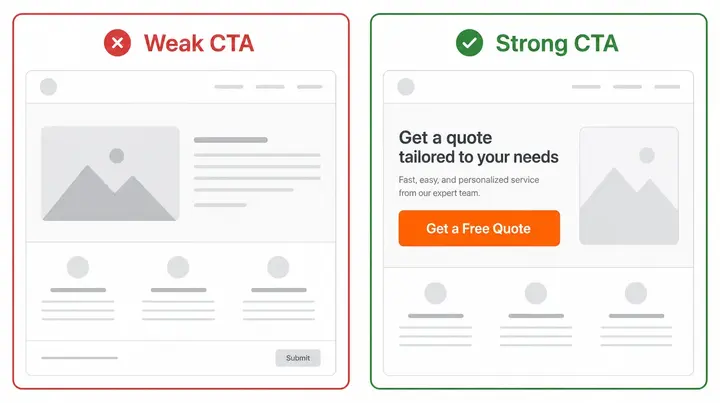
"Contact us" buried in the navigation is not a call to action. Neither is a generic form at the bottom of the page.
Fix: Every page needs one primary action — book a call, request a quote, send a WhatsApp message, place an order. Make it visible above the fold (before the visitor scrolls), use a contrasting button colour, and use specific language: "Get a Free Quote" outperforms "Submit" every time.
Reason 3: Your Site Takes Too Long to Load
Google has published its data on this: 53% of mobile visitors leave a page that takes more than 3 seconds to load. Most small business websites in Malaysia and India load in 6–12 seconds on a mobile connection.
Your visitors aren't being impatient. They're behaving exactly as expected.
Fix: Compress your images (unoptimised photos are the #1 culprit), use a hosting provider close to your target region, and remove unnecessary plugins or scripts. A web professional can audit and fix this in a few hours.
Reason 4: You're Getting the Wrong Visitors — or No Visitors at All
A website that nobody finds cannot generate leads. And a website optimised for the wrong keywords brings visitors who were never going to buy.
If your site doesn't appear when someone searches "accounting firm Penang" or "web designer Chennai," Google simply doesn't know your site is relevant to those searches. No visibility means no traffic. No traffic means no leads — regardless of how good the site looks.
Fix: At minimum, your site needs basic on-page SEO: the right keywords in your page titles, headings, and meta descriptions; a Google Business Profile linked to your domain; and content that answers questions your customers are actually searching. This is the foundation. Everything else builds on it.
Reason 5: Your Website Doesn't Look Trustworthy Enough to Buy From
This one is harder to diagnose because it's not a single problem — it's a cluster of small signals that add up to "I'm not sure I trust this."
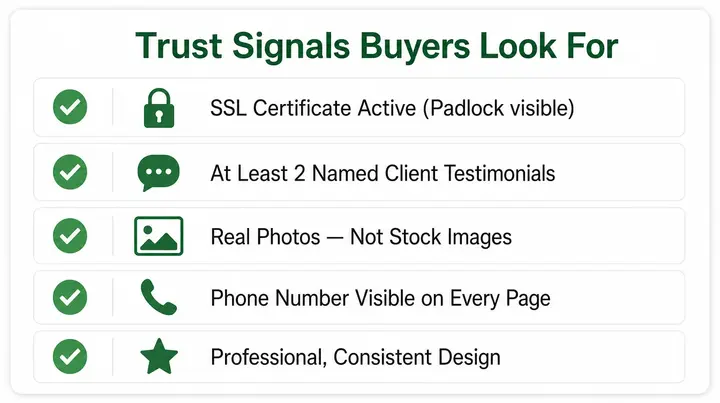
Buyers in Malaysia and India, particularly for services above a few hundred ringgit or rupees, are increasingly careful. They look for: a professional design, real photos (not stock), a visible address or phone number, testimonials from named clients, and an SSL certificate (the padlock in the browser bar). Missing two or three of these and the hesitation sets in.
Fix: Add at least two genuine client testimonials with names (first name is enough). Replace stock photos with real ones where possible. Make sure your phone number and location are visible on every page. Verify your SSL is active.
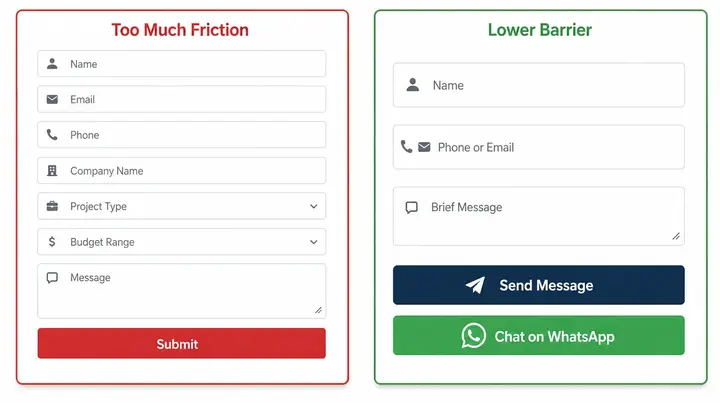
Reason 6: Your Contact Process Has Too Much Friction
A contact form that asks for name, email, phone, company name, project type, budget range, and message is not thorough — it's exhausting. Most people close it.
The same applies to a booking system that requires account creation before the customer can see your availability.
Fix: Reduce your contact form to 3 fields maximum for initial enquiries: name, email or phone, and a brief message. Add a WhatsApp button as an alternative — in Malaysia and India, WhatsApp is how people prefer to start conversations with businesses. Lower the barrier and more people will cross it.
What a Lead-Generating Website Actually Looks Like
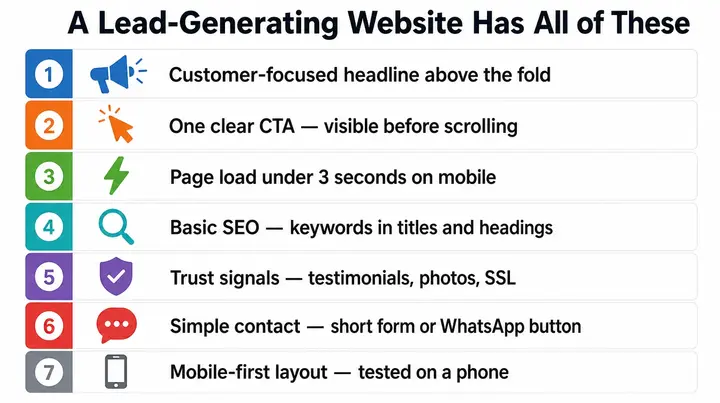
A website that consistently brings in enquiries has most of these:
- A headline that names the customer's outcome, not the company
- One clear CTA above the fold — visible before the visitor scrolls
- Page load time under 3 seconds on mobile
- Basic SEO — right keywords in titles, headings, and meta descriptions
- Trust signals — testimonials, real photos, contact details, SSL
- A simple contact path — short form or WhatsApp button, not both competing
- Mobile-first layout — tested on a phone, not just a desktop
That's the full list. No single one of these is difficult to fix. The problem is that most small business websites were built without any of them being checked.